
When writing WebGPU shaders, you usually learn about mistakes only when the browser compiles them: createShaderModule logs an error to the console, or the pipeline creation fails after everything else is already set up. I wasn’t happy with the existing WGSL extensions for VS Code, as none of them caught what Chrome actually rejects, so I made my own: WGSL Linter.
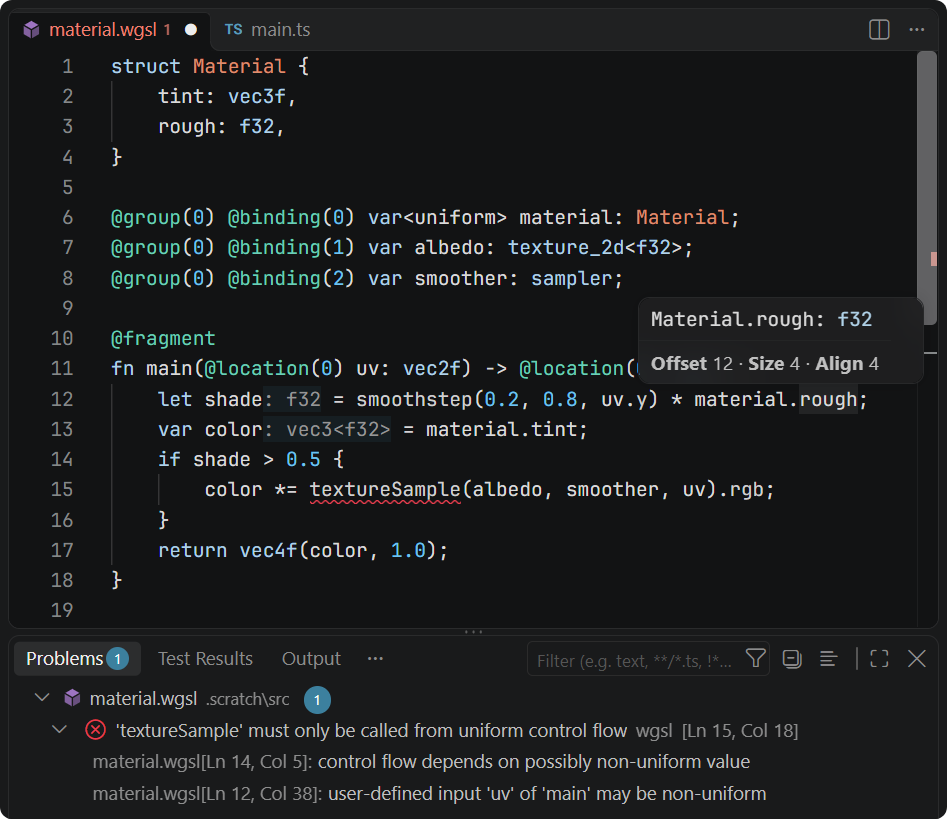
The extension validates shaders the same way Chrome’s WGSL compiler, Tint, does. To make sure of that, the analyzer is tested against the WebGPU conformance test suite, passing 99.7% of the ~47k WGSL validation tests (the only failing one fails in Chrome as well). Besides the usual type checks, this covers const-evaluation, entry-point IO and the uniformity analysis: the screenshot above shows a textureSample call in non-uniform control flow, with the notes tracing the problem back to the fragment input.
On top of the diagnostics there is the rest of the language support: semantic highlighting, completion, signature help, go to definition, references, rename and formatting. Hover shows the memory layout of the structs used in buffers (no more guessing vec3 padding) and spec descriptions with links for the builtins and attributes, while inlay hints show the inferred types.
WGSL is often embedded into JavaScript or TypeScript, so all of the above also works inside template literals tagged with wgsl. The ${} substitutions are treated as opaque, so they don’t produce false errors:
const module = device.createShaderModule({
    code: wgsl`
        @compute @workgroup_size(${size})
        fn main(@builtin(global_invocation_id) id: vec3u) { ... }
    `
});
Besides the extension, the analyzer is available as a dependency-free npm package, which also ships a CLI to check the shaders in CI:
npx wgsl-linter --tag wgsl src
Install the extension from the VS Code Marketplace. It’s free and MIT-licensed; feedback and bug reports are very welcome on GitHub, especially for the shaders where it disagrees with Chrome.
Comments